
Your vehicle's own signals take over the RGB build
Turn signal comes in and the channels you chose run your selected turn pattern. Brake, and the channels you chose answer. Reverse, and the channels you chose answer — with an external relay off the same input bringing up real backup lighting beside them. Let the signal go, and the show comes back.
Now shipping. First production units are going out to customers.
- 12Vehicle inputs
- 5RGB channels
- 8Relay triggers
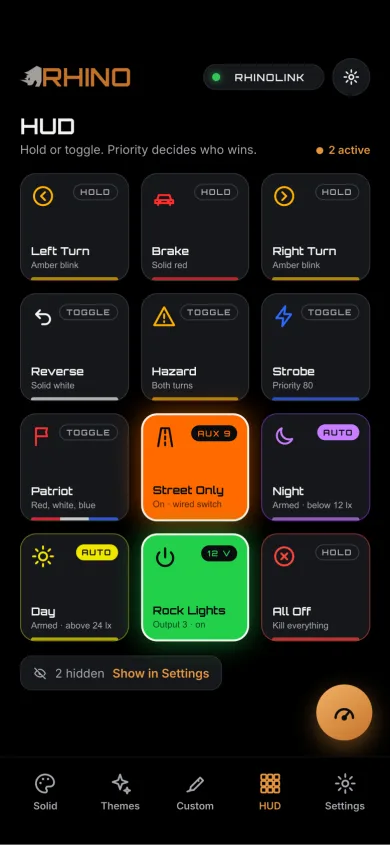
One input. The channels you picked, and nothing else.
You assign a vehicle input to the channels that should answer it. The rest of the machine carries on with whatever it was doing — all 5 channels run independently.
The channels you assigned to the turn input drop what they were showing and run your selected turn pattern, in the direction you are turning. Left and right stay in step with each other.
Example channels- Left Whip
- Right Whip
- Halos
The channels you assigned to the brake input answer in red with your selected brake pattern, and hold it for as long as the pedal is down.
Example channels- Rock Lights
- Halos
The channels you assigned to the reverse input answer in white with your selected reverse pattern. The same input can drive one of the eight relay triggers at the same time, so an external relay brings up real backup lighting alongside the RGB.
Example channels- Rock Lights
- Pod Rings
“Pod Rings” means the RGB ring on a pod — that ring is RGB-system hardware and joins a channel like any other light. A pod’s high-output main beam is not an addressable channel; it switches through an appropriately wired external relay off one of the 8 outputs, the same way backup lighting does. RhinoLink runs Rhino RGB and RGB+W lights on any of its channels, all in sync. Set each channel to the lights on it in the RhinoLED app.
Each function gets its own pattern
Brake, turn and reverse are not one setting. Each one has its own list of variants, and you pick the one you want per function — 21 in total.
Brake light patterns
Selectable variants for the brake input
10Turn signal patterns
Left and right always run the same variant, in step
3Reverse light patterns
Selectable variants for the reverse input
Choosing a variant, and where the choice lives
While a brake, turn or reverse function is active, the Cycle control — on the live trigger HUD in the RhinoLED app, or on a physical switch wired to an input — rotates that function through its variants. You watch the machine, not the screen, and stop on the one you want. Left and right turn always use the same variant and stay in step. Every pattern scales itself to the number of LEDs in the channel.
Then the phone stops mattering. Automotive variant selections are stored on the controller, not in the app. Pick your brake pattern once and the vehicle brakes that way on a dead phone, a different phone, or no phone at all — the board is what watches the inputs and runs the pattern. The app is how you set it up and how you drive the show by hand. See how the inputs are wired and mapped on the trigger system page.
When two things want the same channel, the right signal wins
Put a turn signal and a brake on the same whip and something has to decide. RhinoLink decides — every action carries a rank, and the higher rank takes the channel instead of the two of them fighting over it frame by frame.
Highest rank
-
100
Reverse
Backing up outranks everything. Nothing below it can take a channel away from the reverse pattern.
-
80
Turn / Hazard
A turn or hazard signal outranks braking, and everything under it. Signalling the move wins over showing the stop.
-
70
Brake
Braking outranks Street Only and every decorative pattern on the machine.
-
65
Street Only
A driving-oriented base mode that parks the decoration without touching the three signals above it. More on Street Only.
-
60
Patriot
A dedicated action with its own floor, above the standard actions and below Street Only.
-
55
SOS
A repeating signalling pattern you can map to a trigger. It sits above the standard actions, and below every driving signal on this ladder.
-
40
Standard actions
Everything else you can map to a trigger or a button starts here: the themes, the colors, the show patterns.
Lowest rank
These are floors, not fixed tiers
Every number above is a floor — the rank an action starts at. Priority is configurable from 5 to 150, so you can raise an action above the one sitting over it if that is how you want your machine to behave. What you cannot do is leave it undecided.
Interrupt a channel. Don’t break the whole show.
When a vehicle signal takes a channel, RhinoLink keeps hold of what that channel was doing. On release the pattern, colors, brightness and speed come back. If another channel is still running the same animated pattern, the returning channel re-joins that animation where it is now; with no matching channel still running it, an animation may start again from the beginning. Solid states restore directly.
This is not the Startup Profile. Trigger restore is about a channel coming back after a signal releases; a Startup Profile is what the machine looks like the moment it powers on. Two different features — the Startup Profile has its own page.
Brake light patterns
8 variants — Selectable variants for the brake input
Five rapid flashes, then it holds solid red for as long as the pedal is down. Movement first to catch the eye, then a steady state to read.
Solid red across the whole channel at full brightness. No movement, nothing clever — the plain one.
Red that breathes between full and reduced brightness while the brake is held. Draws attention without strobing.
The rain-light cadence from circuit racing: three very fast flashes, then solid. Short, sharp and instantly readable.
Light opens from the middle of the channel outward to both ends, then holds solid.
A double pulse with a rest between beats — lub-dub, pause, repeat. An irregular rhythm is what peripheral vision picks up.
A bright head with a fading tail behind it, running back and forth along the channel.
The scanning bar with a glow on each side, sweeping end to end. The 80s look, on a modern build.
Turn signal patterns
10 variants — Left and right always run the same variant, in step
Plain amber on, amber off. The cadence every other driver already knows how to read.
Amber runs across the channel in the direction you are turning. The trail length scales with the number of LEDs in the channel.
Two quick flashes, then a pause, repeating. Reads as more urgent than a single blink.
A wave leaves the middle of the channel and fades out toward both ends.
LEDs fill one at a time and stay lit until the channel is full, then clear and start again. The sequential look from modern OEM tail lights.
The light travels to the end of the channel, bounces back, and repeats for as long as the signal is on.
A chase that starts slow and speeds up as it reaches the end of the channel.
Three quick passes across the channel, then a pause. The high-energy one.
A sweep with a long, smoothly fading comet tail behind it. The one that reads best at night.
LEDs stack up one at a time until the channel is full, hold, clear, then repeat.
Reverse light patterns
3 variants — Selectable variants for the reverse input
Full-brightness white across the whole channel. Everything the channel has, pointed backward.
Every fourth LED lit instead of the whole channel — a softer, less harsh reverse light for a garage or a tight camp spot.
White that rises and falls between a low floor and full brightness while reverse is engaged.
Street Only, explained honestly
A driving-oriented base mode rather than a decoration — the setting for when the machine is being driven and the light show is not the point.
What it does
Street Only holds a floor of 65 — above every decorative pattern on the machine, and below Brake, Turn / Hazard and Reverse. Set it and the show sits down, while the three signals that describe what the vehicle is doing still come through on top of it. It is a base state the vehicle functions are allowed to interrupt, which is exactly what a driving mode should be.
Like every other rank on this page it is a floor, not a wall: priorities are configurable from 5 to 150.
What it is not
Street Only is a priority position and a lighting mode. It is not a legal status, it does not certify anything, and no setting in an app can. What counts as acceptable auxiliary lighting on a public road is decided by the rules where you drive — and those rules differ by state, province and country. Read them, then set the machine up to suit them.
Let the vehicle drive the lights
21 automotive patterns across 12 vehicle inputs and 5 RGB channels, on top of 90 built-in patterns and 54 Quick Themes.
Now shipping. First production units are going out to customers.
More on RhinoLink: RhinoLink overview · the trigger system · Startup Profile · controller settings
RhinoLink controls auxiliary and accent lighting. It is not a replacement for required factory vehicle lighting. Lighting regulations vary — check local requirements before public-road use.