
Your lights should know what your vehicle is doing.
RhinoLink wires into your turn, brake and reverse signals and your switch panel, so your Rhino RGB lights and accessories respond to what the vehicle is doing. The RhinoLED app on your iPhone does the rest.
Now shipping. First production units are going out to customers. Photos and full specs
- 5LED channels
- 12Wired inputs
- 8Relay outputs
- 90Animations
The full walkthrough. Board to app, tab by tab.
A RhinoLink board on the bench running real Rhino lights, and the RhinoLED app driving it: Solid, Themes, Custom, HUD and Settings.
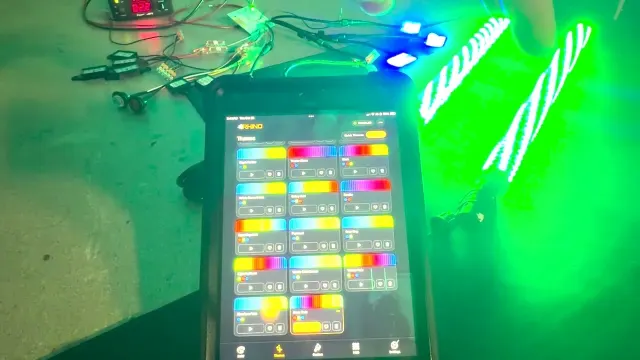
Short on time? The five app tabs are below, one screen each. · Watch on YouTube
A Bluetooth controller waits for your phone. RhinoLink listens to your vehicle.
Signals, not just colors
Wire turn, brake and reverse once. Whips can blink with the turn signal, go red under braking and light the ground behind you in reverse, from 21 automotive patterns.
No phone required
Wired triggers, their priorities and your Startup Profile are stored on the board. Flip a switch and it works, whether the phone is in your pocket or at home.
Lights and accessories together
8 outputs each trigger an external relay, so the button that changes your lights can also bring on a light bar, work lights or a beacon.
Our board. Our firmware. Our app.
A lot of controllers ship with an app licensed from an outside software company, running firmware that came with the module. RhinoLink is Rhino's own work, top to bottom, done in North Carolina.
The board
Rhino designWe drew the board for this controller and own the schematic. Each one is programmed, assembled and tested in our North Carolina building.
The firmware
Written by RhinoEvery pattern, trigger and priority the board runs is our code. When something needs fixing, the people who wrote it fix it.
The app
Built by RhinoRhinoLED was built for RhinoLink, by the team that built RhinoLink. Not a white-label app with our logo on it.
| The commodity model | RhinoLink | |
|---|---|---|
| The board | A finished module, bought in | Designed by Rhino |
| The firmware | Came with the module | Written by Rhino |
| The app | Licensed from an outside developer | Built by Rhino |
| A bug or a feature request | Waits on someone else's roadmap | Goes to the people who wrote it |
Wire it once. Set it up in minutes.
-
Step 1
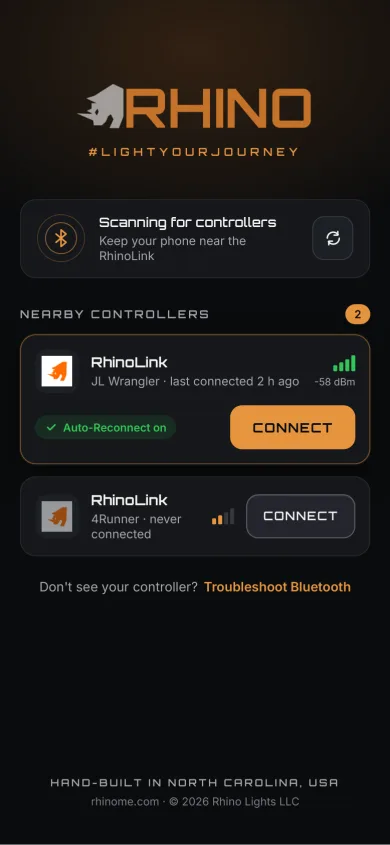
Connect
Open RhinoLED and tap Connect. Next time it reconnects on its own.
-
Step 2
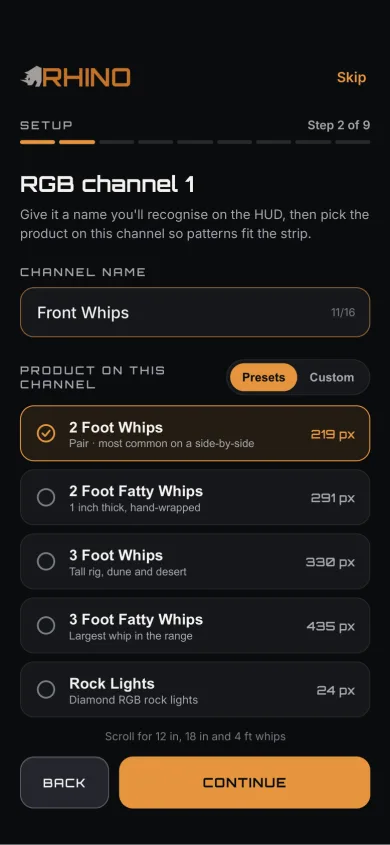
Name your channels
Tell it what is on each of the 5 channels, like Front Whips or Rock Lights, and patterns fit the product.
-
Step 3
Drive
Pick colors and themes by hand, or let your vehicle's signals take over.
Swipe for the next step
Five tabs. Everything it does.
iPhone, iOS 15.0 or later, free download.
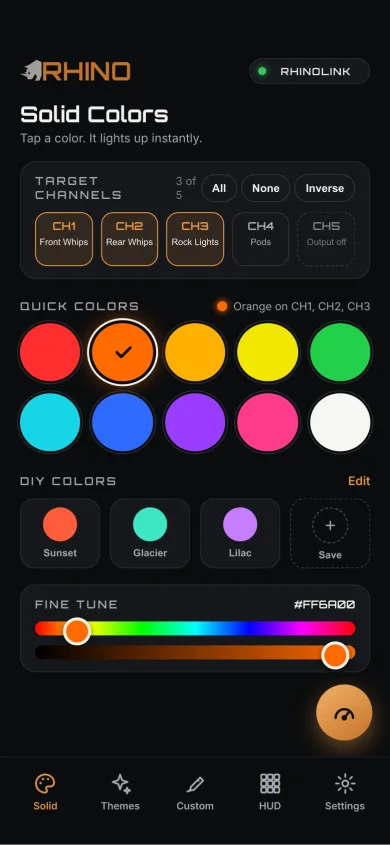
Tap a color. It lights up instantly.
- Choose which channels change: all of them, none, or the opposite of what is selected.
- Ten quick colors, plus your own saved colors one tap away.
- Fine-tune to the exact shade you want.
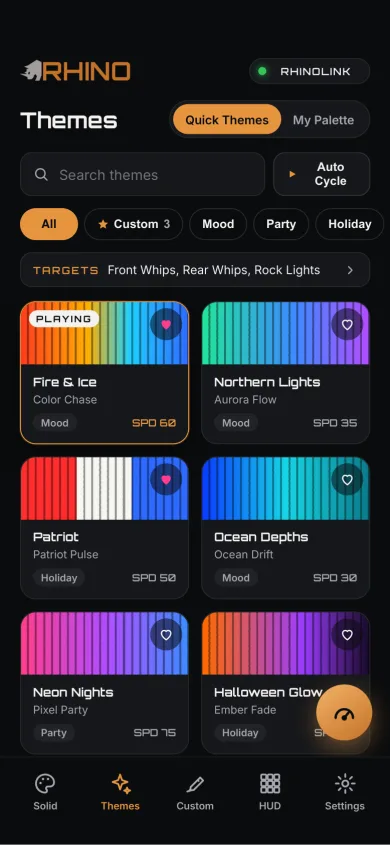
Ready-made looks, one tap each.
- Themes sorted by Mood, Party and Holiday, with your favorites saved.
- My Palette: pick your colors and the app builds combinations from them.
- Every theme plays on whichever channels you choose.
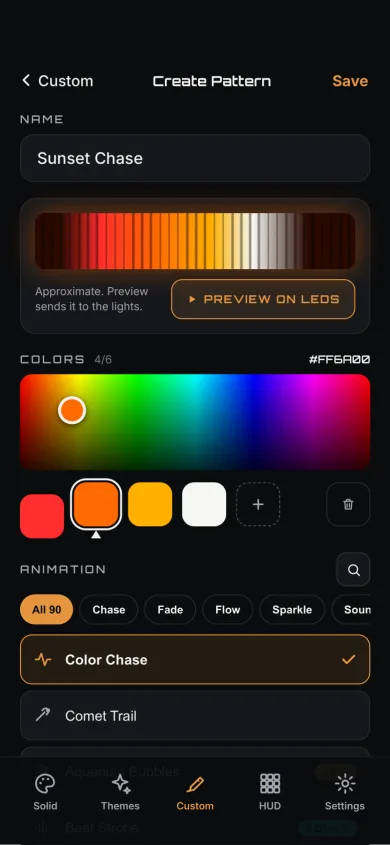
Build your own animation.
- Pick up to six colors and any of the 90 built-in animations.
- Preview it on the lights before you save it.
- 11 sound-reactive animations listen through the microphone on the board.
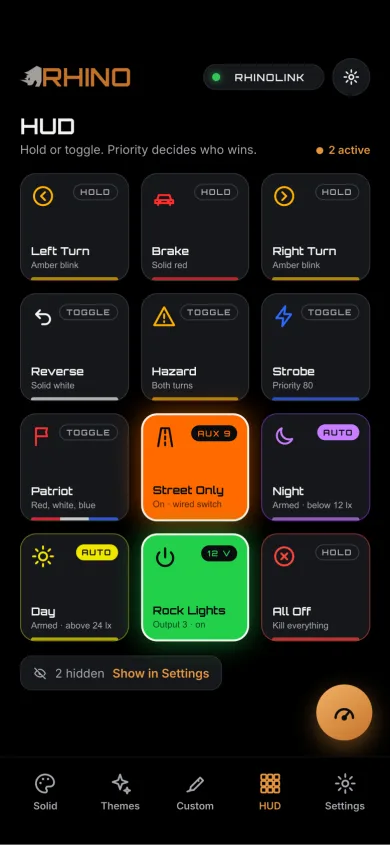
Your switch panel, on your phone.
- Hold or toggle buttons for turn, brake, reverse, hazard and strobe.
- Any button can also run from a real switch wired to one of the 12 inputs, with no phone needed.
- When two buttons want the same lights, priority decides which one shows.
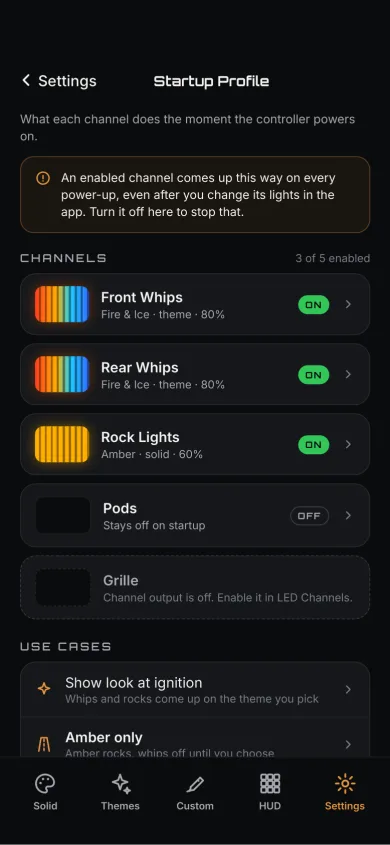
Starts the way you want, every time.
- A Startup Profile sets what each channel does the moment the vehicle powers on.
- Rename the controller, up to 31 characters, and name every channel after what is on it.
- Controller settings are stored on the board, so they are there every time you turn the key.
- Lock the controller with a 6-digit PIN, so a phone that does not know it cannot control your lights.
Build your own button in five steps.
Choose what turns it on, what it does to your lights and accessories, and how it looks on the HUD.
-
1 · Trigger
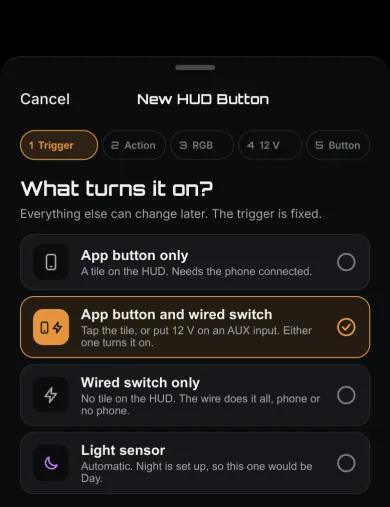
A tile on the HUD, a wired switch, or both.
-
2 · Action
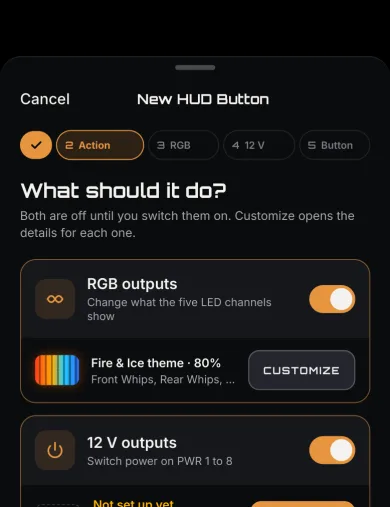
Change the lights, switch accessories, or both.
-
3 · Lights
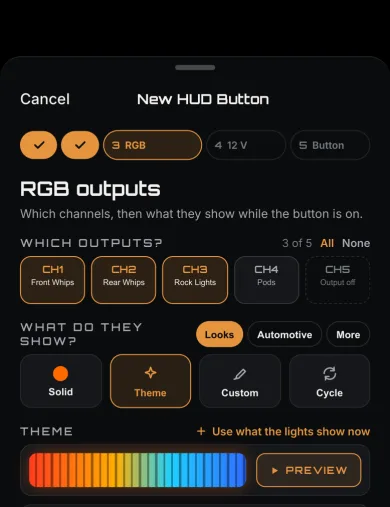
Pick the channels and what they show.
-
4 · Outputs
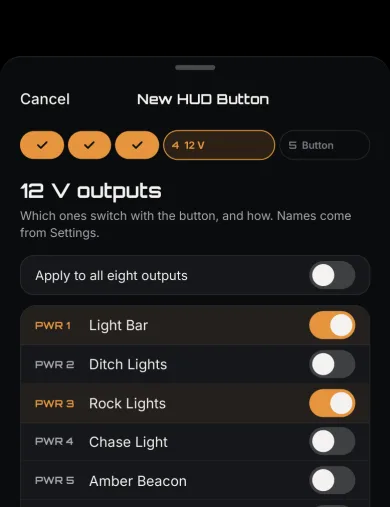
Pick which outputs switch on with it.
-
5 · Button
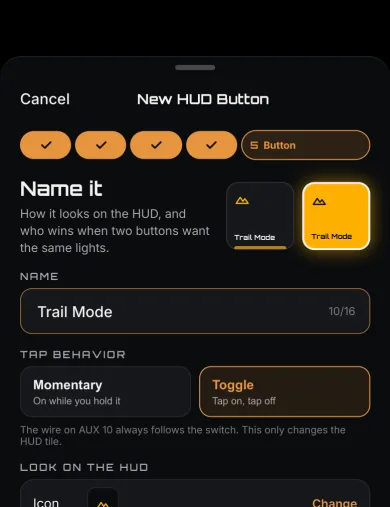
Name it, pick an icon, choose hold or toggle.
Swipe through the steps
The trigger and what it does are saved to the controller, so a wired switch works with or without the phone.
Light part of a strip. The rest keeps its show.
Any HUD button that lights RGB can take a whole channel or just the pixels you pick, channel by channel. Up to 8 sections per button.
-
Pick
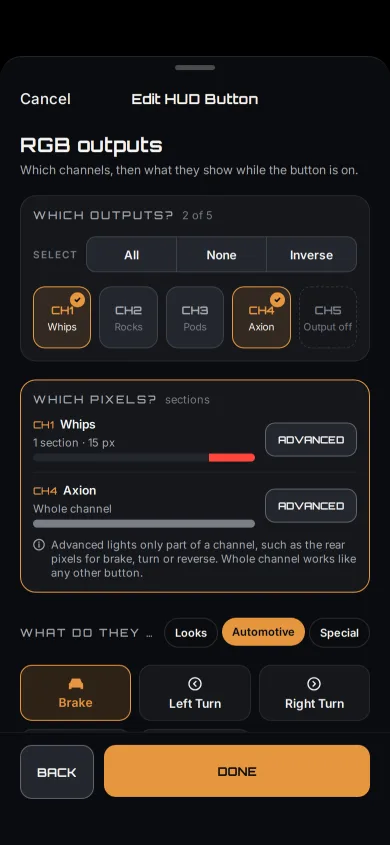
Whole channel or sections
In the button editor, choose for each channel: all of it, or only the parts you pick.
-
Place
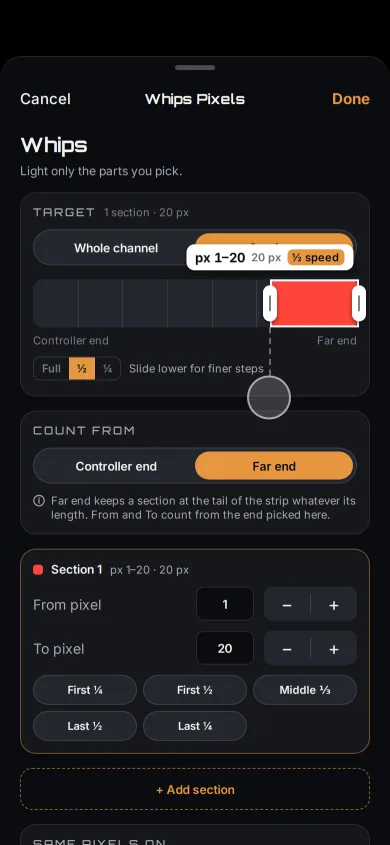
Drag along the strip
Drag a section into place, set From and To pixel by pixel, or tap a quick pick like Last ¼.
-
Show
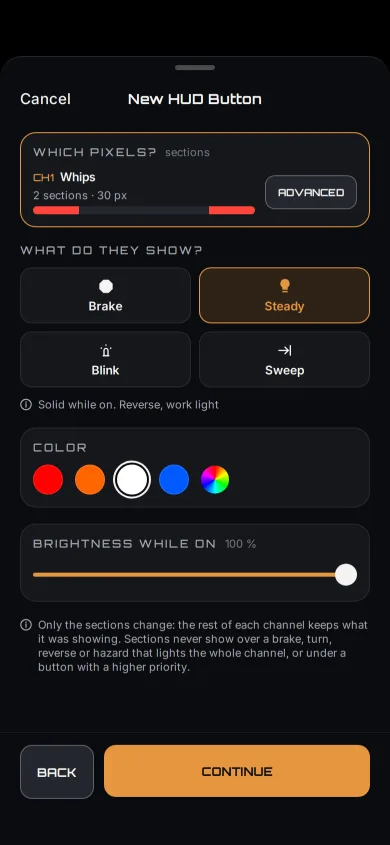
Choose what it shows
Brake, turn, hazard and reverse run your chosen pattern inside the section. Other buttons show one color: Steady, Brake, Blink or Sweep.
Swipe for the next step
Example: brake lights on the ends of a rear strip
A 100-pixel rear strip on CH2. The Brake button, wired to input 1, lights pixels 11–25 and 76–90 only, from the pedal or the HUD tile.
- Pixels outside a section are never touched. The rest of the strip keeps playing its theme.
- The wired switch and the HUD tile do exactly the same thing.
- Wired buttons keep their sections on the controller, so they work with no phone connected.
- A sweep runs across the section only, as if it were the whole strip.
Lock it with a PIN. Other phones stay out.
Turn on Controller lock in Settings and set a 6-digit PIN. A phone that has not entered it cannot control your lights.
-
Lock
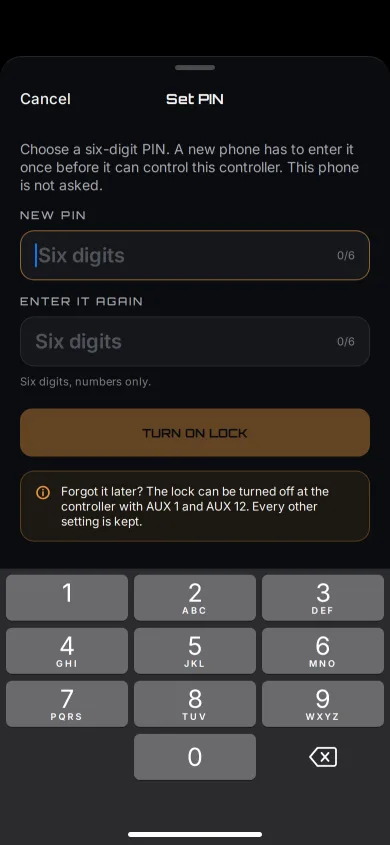
Set a PIN
Choose 6 digits and enter them twice. The phone that sets it is never asked.
-
Share
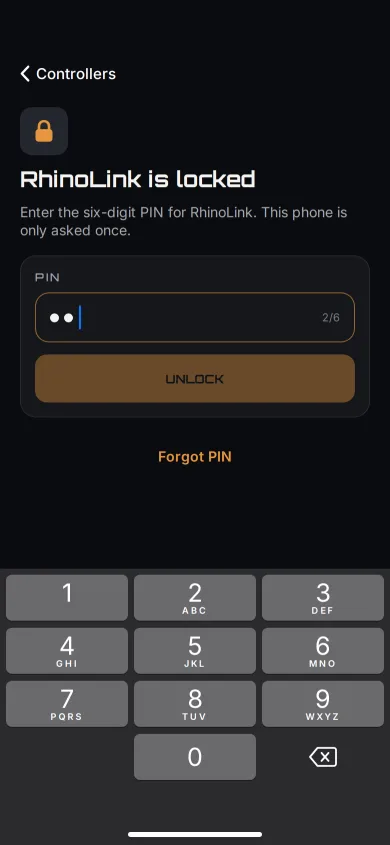
A new phone asks once
Another phone enters the PIN one time, then reconnects on its own after that.
-
Recover
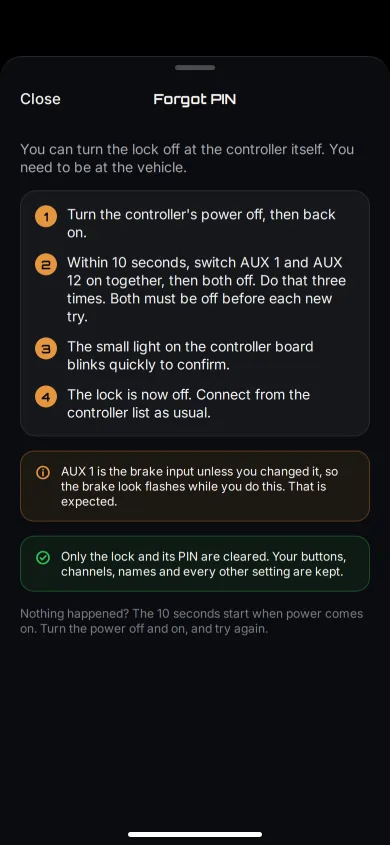
Forgot it? Clear it at the vehicle
Two switches turn the lock off. Your buttons, channels and names are kept.
Swipe for the next step
- Change the PIN and every other phone has to enter the new one.
- After 5 wrong tries a phone waits 30 seconds, then longer after each miss, up to 15 minutes. Phones that already have access are never locked out.
- No master PIN and no account. Nothing is registered with Rhino.
- The reset needs hands on the wiring, so the lock keeps out other phones, not someone working on the vehicle.
Runs Rhino RGB and RGB+W.
Any channel takes either kind. Mix them on one controller, all in sync, and set each channel to its lights in the RhinoLED app.
RGB
- Diamond RGB rock lights
- Rhino 2.0 whips — 1" RGB
- Rhino 2.5 Fattie whips — 1.3" RGB
- Rhino RGB halos
- RGB strip
- Rhino Pod RGB rings
RGB+W
- Axion RGB+W rock lights
- Rhino 3.0 RGB+W whips
- RGB+W strip
Each channel runs one driver, so RGB+W lights and RGB lights go on separate channels. They cannot share a data line.
8 LED drivers. Set channel by channel.
Each of the 5 channels gets its own driver in the app, so different kinds of lights share one controller and stay in sync.
| Driver in the app | Type | Color order | Channels | Pixels per channel |
|---|---|---|---|---|
| RhinoLEDDefault WS281x | RGB | GRB | All 5 | Up to 438 |
| SK6812 RGBW | RGBW | GRBW | All 5 | Up to 438 |
| APA106 | RGB | GRB | All 5 | Up to 438 |
| LC8812 | RGB | GRB | All 5 | Up to 438 |
| TX1812 | RGB | GRB | All 5 | Up to 438 |
| TM1914 | RGB | GRB | All 5 | Up to 438 |
| TM1829 | RGB | GRB | All 5 | Up to 438 |
| Rhino RGBW TM1814, used by Axion, RGB+W whips and RGB+W strip | RGBW | WRGB, fixed | All 5 | Up to 438 |
Each channel runs one driver, so RGB+W lights and RGB lights go on separate channels. They cannot share a data line.
| Product | Driver setting | Result |
|---|---|---|
| DS18 RGB speakers | RhinoLED (WS281x), the default | Lights in sync with the rest of the system |
This chart lists the third-party products Rhino has run on RhinoLink and confirmed. A product that is not listed has not been tested by us.
Specs
Under the lid.
Show all specs +
- Wireless
- Bluetooth Low Energy. No WiFi, no cloud, no subscription.
- Vehicle inputs
- 12 × opto-isolated 12 V, debounce 0–1000 ms per input
- LED channels
- 5, each independent, RGB or RGB+W
- Outputs
- 8, each triggers an external relay
- Animations
- 90 built-in, including 11 sound-reactive; 21 automotive (8 brake, 10 turn, 3 reverse)
- Trigger actions
- 21, plus a relay-only mode that fires outputs without touching a channel
- Controller name
- Up to 31 characters
- App
- RhinoLED: iPhone, iOS 15.0 or later, free download
- Pixel sections
- Up to 8 per HUD button, set channel by channel
- Controller lock
- 6-digit PIN, set in the app
- LED drivers
- 8, set channel by channel
- System
- Rhino RGB and RGB+W lights, in sync, on any channel
Before you order.
Do I need my phone with me?
No. Once it is set up, wired triggers, their priorities and your Startup Profile run on the board itself. The app is for setting it up and for hands-on control: colors, themes, and HUD buttons that have no wire behind them.
Which phones does the app run on?
RhinoLED: iPhone, iOS 15.0 or later, free download.
Where are my settings saved?
On the controller: trigger mappings, your Startup Profile, automotive pattern choices, output settings and the controller's name. On your phone: the HUD layout, favorites, custom themes, My Palette and custom patterns.
Can someone else's phone control my lights?
Turn on Controller lock to keep other phones out. Set a 6-digit PIN in Settings, and a phone has to enter it before it can control anything. Your own phone is never asked, and any other phone you trust enters it once.
What if I forget the PIN?
Clear it at the vehicle. Turn the controller's power off and back on. Within 10 seconds, switch AUX 1 and AUX 12 on together, then both off, three times. A small light on the controller board blinks quickly to confirm. Only the lock and its PIN are cleared: your buttons, channels, names and every other setting are kept. AUX 1 is the brake input unless you changed it, so the brake lights flash while you do it.
When does it ship?
Now shipping. First production units are going out to customers.
Already running one? The details are here.
Build the vehicle, not just the light show.
5 LED channels, 12 wired inputs, 8 relay outputs and the RhinoLED app: one control system for the whole build.
Now shipping. First production units are going out to customers.
RhinoLink controls auxiliary and accent lighting. It is not a replacement for required factory vehicle lighting. Lighting regulations vary — check local requirements before public-road use. Engineered, built and serviced in North Carolina.